Sunday, November 16, 2008

Faced your darkest fears

Faced your darkest fears in this exciting online games but before you play be sure to turn off the lights and put your headphones or speakers on and loud... Enjoy playing.. Here are some screen shots go to www.hotel626.com and enjoy.

Your time has to be 6:00 Pm in order to play but to cheat this just simply change your pc time to 6:00 pm and then refresh your browser.


Thursday, November 13, 2008

Browser Wars

In 1994, Netscape put up the first fences on the Web in so-called browser wars. In order to attract users, they threw universality to the wind and created a set of extensions to HTML that only Netscape could handle. For example, Web surfers using Netscape could view pages with different size and color text, photographs in JPEG format, background color and images, and in later versions, Multiple pages in a single window, called frames. Surfers with any other browser would get errors and funny looking results. Or nothing at all.

But people liked those extensions so much that they flocked to Netscape. By June of 1996, it had become the most popular computer program in the world with 38 million users.

Microsoft soon joined in, and started putting a fence in its own chunk of the Web. Again, to attract users they added non-standard extensions to HTML that only Internet Explorer, Microsoft's browser, could recognize.


So who do you design for? Netscape, Internet Explorer, Mozilla Firefox, Opera or Flock users? It's a designer's nightmare and the web is suffering because of it.

By:
Elizabeth Castro
HTML 4 for the World Wide Web, Fourth Edition
Visual QuickStart Guide

Tuesday, November 4, 2008

Introduction to HTML

Before we go to our basic coding in HTML, Lets all start from the beginning.

All of the web pages are written in HTML, HTML lets us add graphics, sound, video and format text and then save it all in a text only or ASCII file the only a computer can read. The Key to HTML is in the TAGS keywords enclosed with (<) or Less Than and (>) Greater Than signs.

But today their is a lot of software programs that can create HTML codes like the most known Macromedia but the advantage in learning HTML on your own means you'll never be limited to a particular program's feature and you can add whatever you want without having to struggle with confusing software or wait for software updates instead you can use even NOTEPAD in making web pages.


Macromedia Preview...

In this Blog we will go over to the basic to advanced in HTML.

HTML or HyperText Markup Language has 2 essential features, the HYPERTEXT and UNIVERSALITY. Hypertext means you can create a link in a web page that leads the visitor to any other page and Universality means that HTML documents are saved as ASCII or Text Only Files virtually any computer can read a Web Page.

Next week we are going to lea

Tuesday, October 28, 2008

ALL NEW ADOBE CREATIVE SUITE 4

Are you using the Adobe CS3? If you are going to ask me that question my answer would be sometimes, Because I am using the CS2 version and when I decided to use CS3, Abode release another one again, I haven't use the CS3 to its full potential yet but I really do hope that CS4 will be much greater to use than the previous versions of adobe. Anyway heres a little details about CS4.

The latest version, Adobe Creative Suite 4 (CS4), was announced on September 23, 2008 as the successor to Adobe Creative Suite 3. It was officially released on October 15, 2008. 30-day trials for all products except those in Japanese should be available by mid-November 2008. Japanese-language trials are expected to be available by early December 2008. Adobe sells Creative Suite applications in six different combinations called "editions".

New in Creative Suite 4

All applications in CS4 feature the same user interface, with a new tabbed interface for working with concurrently running Adobe CS4 programs where multiple applications can be opened inside multiple tabs contained in a single window. It was announced that nVidia CUDA technology is now supported to allow for the accelerated encoding of video.
Adobe CS4 is also developed to perform better under 64-bit and multi-core processors. Adobe Photoshop CS4, Adobe After Effects CS4, Adobe Premiere Pro CS4, and Adobe Soundbooth CS4 will officially support 64-bit. However, Adobe CS4 64-bit will not be available for Mac OS X. In early testing of 64-bit support in Adobe Photoshop CS4, overall performance gains ranged from 8% to 12%. Those who work with extremely large files may realize noticeably greater gains in performance, in some cases as dramatic as ten times the previous speed. This is because 64-bit applications can address larger amounts of memory and thus result in less file swapping — one of the biggest factors that can affect data processing speed.
by: www.wikipedia.org
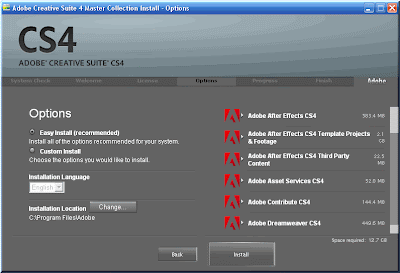
Sample Installation process in Adobe Creative Suite CS4.

Visit www.adobe.com for more info.

Monday, October 27, 2008

The DigitalFilipino Club Networking Event in Cebu and the Cebu Bloggers

Sorry for the late post but anyway, October 23, 2008 the date has been set for the Digital Filipino, I was so excited for this event it's my first time to join to gathering like this one. When I first arrive at the Casino Filipino PAGCOR the organizers of the event was so accommodating, Me and my bestfriend Jun Rhy Crodua was seated at the same table of the istorya.net administrators. The night becomes more exciting when jun and I decided to play the baccarat game and I won the second prize for 1000 but in order to make the 1000 check to money you have to play at the casino so we played Pula sa Puti at the first try we lost the 500 but on the second try we won the 500 and then decided to go home. heheheheh..
Jun Rhy filling up his plate..hehehehe
Jun Rhy(brown shirt), Me(white shirt) and Batang Yagit winston(black shirt) playing baccarat.

Sunday, October 26, 2008

Making Curly Page in a Seconds

This is the final result of what we are going to learn in this tuts.
Step 1:
Create a new page by going to File->New or just directly press CTRL+N, Open two pictures that you want to edit and just drag it to the page you just made to put the picture in the same page and rename the the layers to pict1 and pict2 like show below.
Step 2:

Select pict1 layer and then go to Edit->Transform->Warp (shortcut key is CTRL+T then right click Warp) and the result is shown below.

Step 3:
Now for making the curly page just simply drag the down right edge of the pict1 layer like shown below.

Step 4:
For the finale just add the blending options below (to add blending options just go to Layer->Layer Style->Blending Options or just right click the layer you want to apply the blending options then select blending options).

Drop Shadow:
Outer Glow:
Inner Glow:
And thats it.... If you master this trick you can do this in just a seconds.. Easy, Simple but effective.